
This guide covers fall detection device features and comparisons. No affiliate fee applies to this article.
Fall detection is one of the most discussed features in devices for older adults -- and also one of the most frequently misunderstood. The core idea is valuable: if someone falls and is unable to press a button or call for help, a device that detects the fall automatically and calls for assistance can be lifesaving. But the accuracy of detection, how and where help is summoned, and what the device requires from the user all differ significantly between products. This guide explains how fall detection works and what the main device categories offer. For an overview of medical alert systems including in-home and mobile options, see our guide to best medical alert systems for seniors.
How fall detection works
Fall detection devices contain an accelerometer (measures changes in speed and direction) and a gyroscope (measures orientation and rotation). They monitor these readings continuously and use algorithms to identify the combination of movements that indicates a fall: typically a rapid downward movement followed by sudden deceleration (impact) and then a period of minimal movement (lying still after the fall).
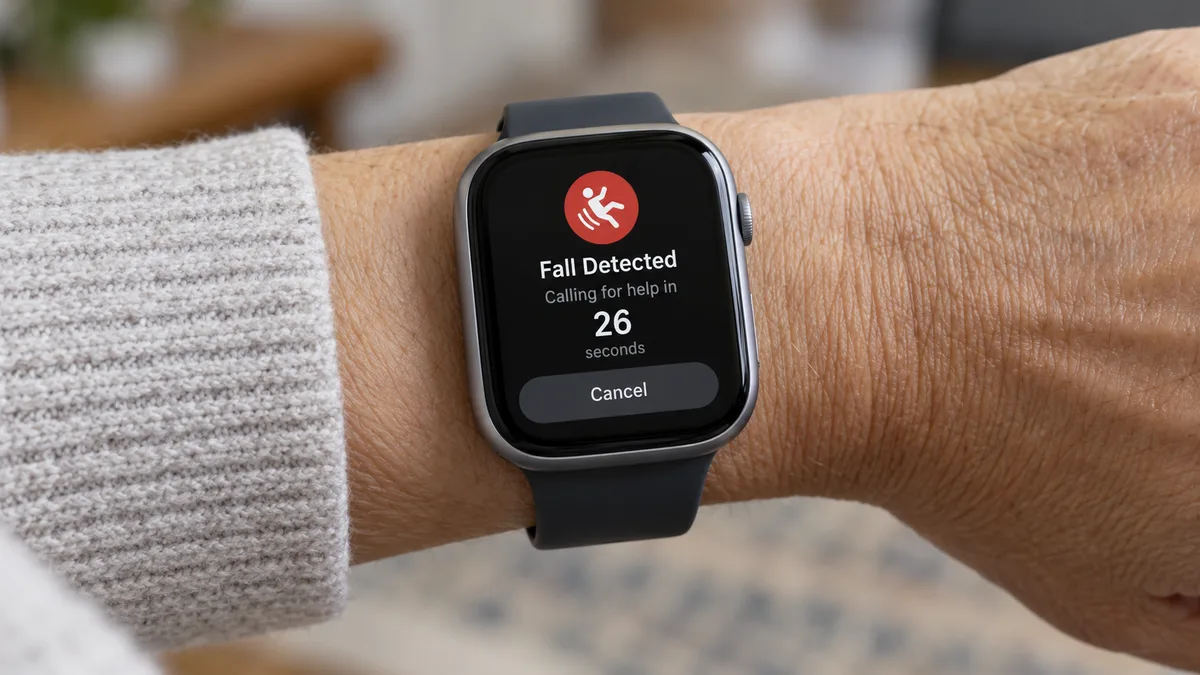
When the algorithm identifies a likely fall, the device alerts the user and starts a countdown. If the user does not cancel the alert within the countdown period, the device calls for help.
The same sensors are why fall detection is imperfect:
- A hard fall typically generates a distinctive signal that the algorithm can identify.
- A soft fall (sliding slowly to the floor) may not generate the same sharp impact signal.
- Some everyday movements (dropping into a chair hard, rapid arm movements during exercise) can generate similar signals to a fall.
No device claims to detect all falls. Every provider that offers fall detection discloses that it is not 100 percent accurate.
Smartwatches: Apple Watch (Researched)
The Apple Watch has offered fall detection since the Series 4 (2018). It is one of the most widely distributed fall detection devices because millions of people already own one for other reasons.
How it works on Apple Watch:
- The watch detects a potential hard fall.
- An alert appears on the watch and the watch taps the wrist.
- A countdown begins (approximately 60 seconds).
- If no response: the watch calls 911 automatically, plays an audio message, and sends a message to Emergency Contacts.
- If the user responds: they can mark themselves as okay, call 911 themselves, or cancel.
Fall detection setup on Apple Watch:
- Open the Watch app on iPhone, go to Emergency SOS, and enable Fall Detection.
- If your age in Health is set to 55 or older, fall detection is enabled automatically.
- Emergency Contacts must be set up in the Health app (Medical ID section).
What Apple Watch does not do:
- It does not connect to a 24-hour monitoring center. It calls 911 directly.
- It requires an iPhone for initial setup and for certain features, though the LTE versions can call 911 independently.
- It requires regular charging (daily or every two days depending on usage).
Dedicated medical alert devices with fall detection (Researched)
Many medical alert providers offer fall detection pendants or wristbands. These differ from smartwatches in a key way: they connect to a live monitoring center rather than calling 911 directly.
When fall detection triggers on a medical alert device:
- The device alerts the monitoring center.
- A monitoring operator attempts to communicate through the device's speaker.
- The user can say they are okay (canceling the dispatch), ask for help, or not respond.
- If no response: the operator contacts emergency services or designated contacts.
The monitoring center step adds a buffer that may reduce unnecessary 911 dispatches. A person who fell but is not seriously hurt can tell the operator they are okay without emergency services being sent. Some users and families prefer this approach.
Trade-off: a monitoring center requires a monthly monitoring fee (typically $30 to $50 per month for mobile GPS with fall detection). An Apple Watch requires the watch purchase and no ongoing monitoring fee, but calls 911 directly.
Key considerations before choosing a device with fall detection
The device must be worn
Fall detection provides no protection for a device left on a table or plugged in charging. A device that the user finds uncomfortable and rarely wears is less useful than a simpler device they wear consistently.
Wristband-style devices are generally worn more consistently than pendant-style devices. Some users prefer the smaller, more discreet form factor of a pendant. Match the device type to the user's preferences.
Charging and battery life
Apple Watch requires daily or every-other-day charging. A dedicated medical alert device may have battery life of several days to a week. Battery life is a practical consideration: a device that runs out of charge regularly will not be worn when the battery is dead.
Where it calls for help
Apple Watch calls 911. Dedicated medical alert devices call a monitoring center. Understand which approach is preferred -- some people want a live operator as an intermediary; others are comfortable with a direct 911 call.
For in-home-only protection
If coverage is needed only within the home, an in-home medical alert system with a fall detection add-on is typically the lowest-cost option. For coverage away from home, a mobile GPS device with fall detection or a smartwatch is more appropriate.
For in-home systems specifically, see our guide to in-home medical alert systems.
What to compare before choosing
Three questions:
- Who does it call? 911 directly (Apple Watch) or a monitoring center (dedicated device)?
- Will the device be worn consistently? Comfort and convenience determine whether the feature is actually used.
- What is the total cost? Apple Watch: purchase price, no monthly fee. Dedicated device: monitoring fee monthly, possibly equipment cost.
Frequently Asked Questions
How accurate is fall detection on smartwatches?
It detects hard falls well. Soft falls and some fall types may not be detected. False positives (non-fall movements triggering the alert) occur. No device detects all falls.
Does the Apple Watch call 911 automatically if you fall?
If you do not respond to the alert within approximately one minute, yes. You can cancel during the countdown if the detection was a false positive.
What is the difference between Apple Watch fall detection and a dedicated medical alert device?
Apple Watch calls 911 directly. Dedicated medical alert devices connect to a monitoring center operator who can assess before dispatching help.
Do fall detection watches work if you are unconscious?
If the device detects a fall and you do not respond within the countdown, it calls for help regardless of your condition. The device must be worn.
One thing to try this week
If you or someone you know has an Apple Watch, open the Watch app on the iPhone, tap Emergency SOS, and check whether Fall Detection is turned on. If not, turn it on. Then open the Health app, tap your profile, and confirm Emergency Contacts are set with current names and numbers. This takes five minutes and activates a safety feature that may already be on a device you own. For a full comparison of medical alert device types, see our guide to best medical alert systems for seniors.
Device descriptions based on publicly available product information and regulatory guidance. This guide does not constitute medical advice.
Sources
- Apple, Fall Detection on Apple Watch: support.apple.com
- FTC, Medical Alert Systems: consumer.ftc.gov/articles/medical-alert-systems